
Logging in to the 88DD Game is simple if you already have a registered account. You normally only need your registered mobile number or username and the password you created during signup.
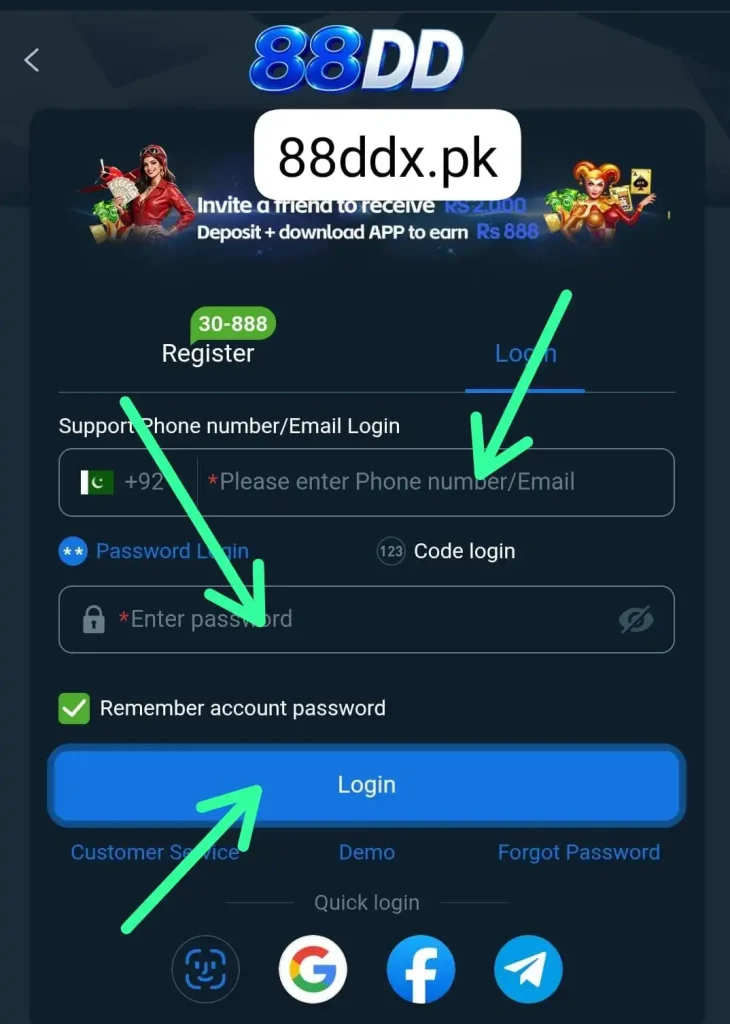
This guide explains how to log in step by step, what to do if you forget your password, and how to fix common login problems. It also includes a few simple account safety tips that can help you avoid unnecessary issues.
What Do You Need to Log In to 88DD?
Before you start, make sure you have the correct account details ready.
You may need:
- Your registered mobile number or username
- Your account password
- A stable internet connection
- Access to your registered phone number if verification is required
- The latest working version of the app
Using the same details you entered during registration usually helps you avoid login errors.
How to Log In to 88DD Game
Follow these simple steps to access your account:
- Open the 88DD Game app or login page.
- Tap Login or Sign In.
- Enter your registered mobile number or username.
- Type your password carefully.
- Check that there are no typing mistakes.
- Tap the Login button.
- Complete any verification step if requested.
- Wait for your account dashboard to open.
Once you are logged in, you can access the features available on your account.
Log in Using a Mobile Number
Many users prefer logging in with the same phone number they used during registration. If mobile login is available, enter your registered number in the login field and then type your password. Make sure you use the correct number format. A missing digit or wrong number can stop the login from working even when the password is correct.
What If You Forget Your Password?
If you cannot remember your password, look for a Forgot Password or Reset Password option on the login screen.
The recovery process may work like this:
- Tap Forgot Password.
- Enter your registered mobile number.
- Request a verification code.
- Enter the code sent to your phone.
- Create a new password.
- Confirm the new password.
- Return to the login page.
- Sign in using the new password.
Do not share the verification code with anyone.
Why Is My Password Not Working?
A password error does not always mean your account has a serious problem. It can happen because of a small typing mistake.
Check these points:
- Make sure Caps Lock is not causing an issue.
- Enter uppercase and lowercase letters correctly.
- Check for accidental spaces.
- Make sure you are using the current password.
- Avoid copying a password with extra characters.
- Reset the password if you cannot remember it.
If you recently changed your password, make sure you are not entering the old one.
Common 88DD Login Problems and Solutions
| Login Problem | Possible Solution |
|---|---|
| Incorrect password | Re-enter the password or reset it |
| Mobile number not recognized | Check that you entered the registered number |
| Verification code not received | Check network coverage and request another code |
| Login page not loading | Check your internet connection and reopen the app |
| Account temporarily unavailable | Wait a short time and try again |
| App keeps closing | Restart your phone and reopen the app |
| Old app version | Update the app if a newer compatible version is available |
| Login button not responding | Close the app completely and open it again |
Verification Code Not Received
Sometimes the system may ask for an OTP or verification code before allowing access to the account.
If you do not receive it:
- Check that your registered number is active.
- Make sure your phone has network coverage.
- Wait for a short time before requesting another code.
- Avoid requesting too many codes quickly.
- Restart your phone if SMS delivery appears delayed.
Only enter verification codes inside the official account verification screen.
Account Locked After Multiple Login Attempts
Entering the wrong password several times may sometimes cause a temporary login restriction. If this happens, avoid repeatedly trying random passwords. Wait for the temporary restriction to end or use the password recovery option if available. Repeated failed attempts can make account recovery more difficult, so resetting the password is usually better than guessing.
How to Keep Your 88DD Account Secure
Your login details should always remain private. Simple security habits can reduce the chance of unauthorized access.
- Use a strong and unique password.
- Never share your password with another person.
- Do not share OTP or verification codes.
- Avoid logging in on public or unknown devices.
- Log out when using a shared phone.
- Keep your device screen lock enabled.
- Avoid unknown links claiming to offer account rewards.
- Change your password if you notice unusual activity.
Should You Save Your Login Details?
Saving login details on your personal device can be convenient, but it is not recommended on a shared or public phone. If other people can access the device, they may also be able to open your account. On shared devices, enter the password manually and log out when you are finished.
How to Log Out of Your Account
Logging out is useful when you use a shared device or want to switch accounts.
The option is usually available in the account, profile, or settings section.
To log out:
- Open your account menu.
- Go to Profile or Settings.
- Find the Logout option.
- Tap it once.
- Confirm if the app asks for confirmation.
You will then return to the login screen.
What to Do After Logging In
After accessing your account, check your profile and account information before making transactions or using other features.
You can review:
- Your registered account details
- Available account balance
- Transaction history
- Deposit and withdrawal options
- Current promotions
- Security settings
- Responsible gaming controls, if available
Checking these details regularly can help you notice mistakes or unusual activity early.
Frequently Asked Questions
How do I log in to the 88DD Game?
Open the app, tap Login, enter your registered mobile number or username and password, then submit the form.
What should I do if I forget my password?
Use the Forgot Password option and follow the verification steps to create a new password.
Why is my 88DD login not working?
The problem may be caused by an incorrect password, wrong mobile number, weak internet connection, temporary server issue, or outdated app version.
Can I log in on another phone?
You may be able to log in on another compatible device using the same account details. Additional verification may be required.
Why am I not receiving the login OTP?
Check your phone number, network signal, and SMS inbox. Wait a short time before requesting another code.
Can I stay logged in?
Some apps keep users signed in until they manually log out. This is convenient on a personal phone but should be avoided on shared devices.
What should I do if my account is locked?
Wait for any temporary restriction to expire and use the password recovery option instead of repeatedly entering incorrect details.
Can I change my password after logging in?
If the account settings include a password option, you can usually change it after confirming your existing details or completing verification.
Final Words
Logging in to the 88DD Game is usually quick when you have the correct registered details. Enter your mobile number or username carefully, type the correct password, and complete verification if the system asks for it. If you face a login problem, first check your internet connection and account details before resetting your password. Keep your password and verification codes private, especially if the account is connected to deposits, withdrawals, or real-money gaming.